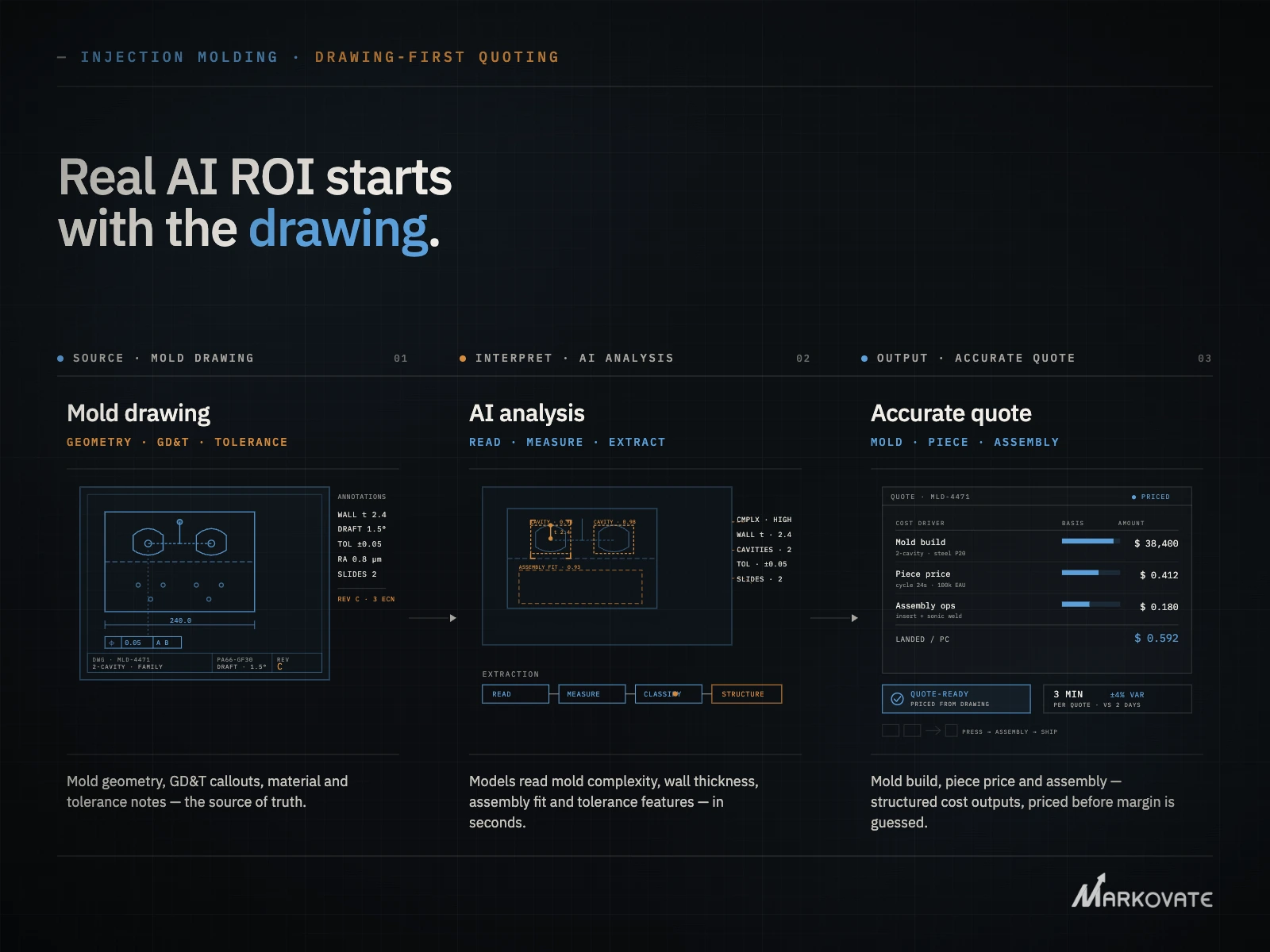


A shop wins an RFQ for a part that starts as a permanent mold casting. It gets machined next, then moves to assembly. The quoting software prices the machining step well. It has no framework for the casting cost or the assembly labor.
Another shop gets a different RFQ. The customer sends a 2D print. No 3D model exists. Most CNC quoting software needs a STEP file to run. Without one, the estimator is back to reading the print line by line.
Both shops already use quoting software. Both still hit a wall.
This blog breaks down what quoting software for CNC machining actually fixes, where multi-process parts and 2D-only prints still break it, and how AI changes the starting point before pricing ever begins.
Quoting Software for CNC Machining
Quoting software for CNC machining automates pricing for machined parts. It replaces manual estimating and spreadsheet formulas with a system that applies consistent rules across every quote.
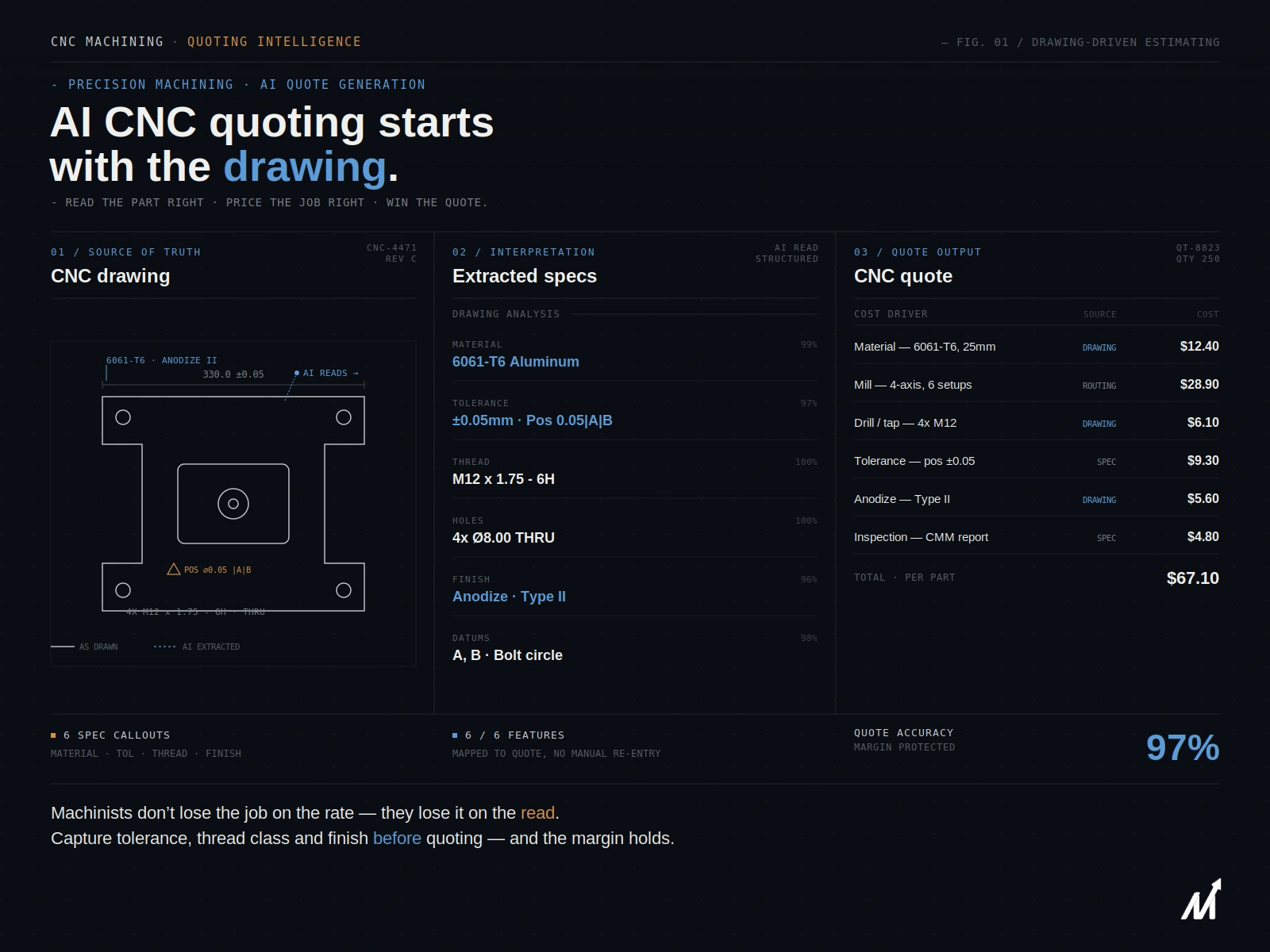
Most CNC quoting platforms work the same way. An estimator uploads a 3D CAD file, usually a STEP or native format. The software analyzes the geometry, detects features like holes, pockets, and threads, and calculates machining time. From there, it applies machine rates, material costs, and markups to generate a price.
This works well for a single-process shop quoting straightforward machined parts from clean 3D files. It gets harder the moment a job doesn’t fit that pattern — and in practice, a lot of RFQs don’t.
Where Quoting Software for CNC Machining Delivers Real Value
Machine shops adopt quoting software to solve specific, recurring problems. When it fits the job, the payoff shows up fast.
1. Faster RFQ turnaround
Manual estimating can take hours per part. Software cuts that to minutes by automating feature recognition and cost calculation. Shops respond to RFQs before competitors finish reading them.
2. Consistent pricing across estimators
Two estimators pricing the same part by hand often land on different numbers. Quoting software applies the same rate logic every time, regardless of who runs the quote.
3. Fewer data-entry mistakes
Manual quoting involves re-keying dimensions, tolerances, and material specs by hand. Every re-key is a chance for an error. Software pulls this data directly from the file instead.
4. Built-in manufacturability checks
Better platforms flag features that are difficult or expensive to machine before a quote goes out. This catches problems early, when they’re cheap to fix, instead of after the job is already on the floor.
5. Higher win rates
Faster, more accurate quotes win more work. A shop that responds in hours instead of days gets first look at a buyer’s decision, more often than not.
Where Standard CNC Quoting Software Still Breaks Down
These benefits depend on a clean input: one process, one 3D file, straightforward geometry. Plenty of real RFQs don’t look like that.
1. Multi-process parts don’t fit a single pricing model
A part that moves through casting, CNC machining, and assembly needs three cost models working together, not one. Permanent mold casting carries its own cost drivers — tooling, draft angles, parting lines, and cast blank material. Standard CNC quoting software prices the machining step and stops there. Assembly labor and purchased components often get added manually, after the fact, if they get priced consistently at all.
The result is a quote built from three disconnected estimates instead of one accurate number.
2. 2D-only prints leave the software with nothing to read
A large share of RFQs, especially from job shops working with castings or legacy tooling, arrive as a 2D print or a scanned PDF. No 3D model exists to upload. Most CNC quoting platforms require a STEP file or native CAD format to run their geometry analysis. Without one, the estimator falls back to manual takeoff, which defeats the purpose of the software in the first place.
3. GD&T callouts get re-keyed, and details get lost
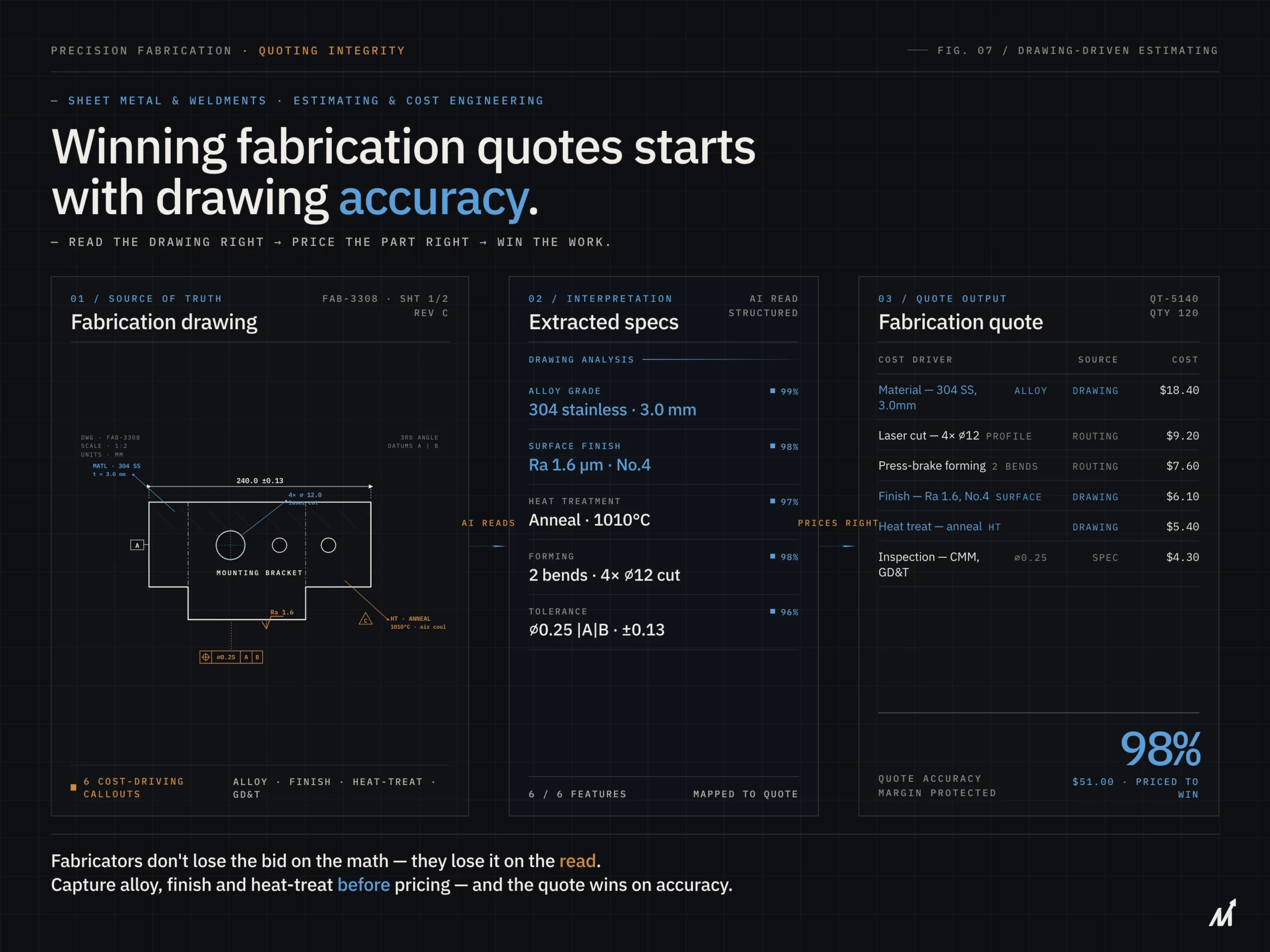
Tolerance callouts drive real costs. A true position tolerance at MMC changes what inspection process a job needs. A tight flatness callout can require secondary grinding operations that a standard quote misses. When GD&T gets manually retyped into a quoting tool instead of being extracted directly from the drawing, these details are the first thing to drop.
Why the Gap Starts With the Drawing, Not the Software
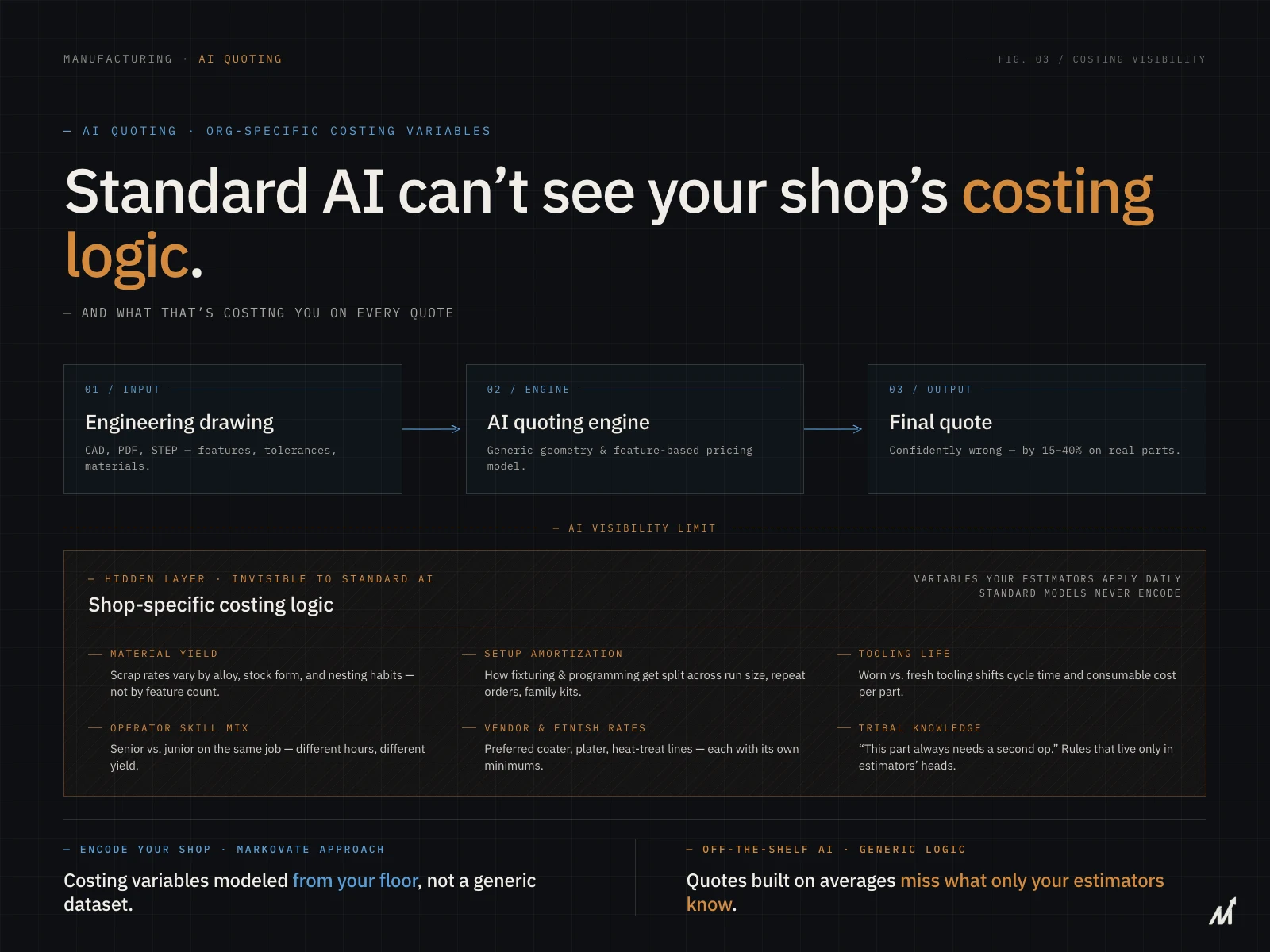
Quoting software is only as accurate as what feeds it. If a shop can’t upload a 3D file, most platforms have nothing to analyze. If a part spans multiple processes, most platforms only understand one of them.
The software isn’t broken. It was never built to read what it’s being handed.
That’s the real gap. Not the pricing engine itself, but the step before it — turning a drawing into structured, priceable data the software can actually use.
How AI Changes CNC Quoting From the Ground Up
AI drawing intelligence works upstream of the quoting engine. Instead of requiring a clean 3D file, it reads the drawing directly, in whatever format it arrives.
1. It reads 2D prints and scanned PDFs, not just 3D files
AI extraction works across DWG, DXF, STEP, PDF, and scanned formats. A missing 3D model no longer stalls the quote. The system reads dimensions, geometry, and callouts straight from the print.
2. It flags multi-process routing automatically
When a feature pushes a part into a different process, casting versus machining, in-house versus outside service, the system flags the routing change. A casting-to-machining-to-assembly job gets priced as one structured job instead of three separate guesses.
3. It extracts GD&T and cost drivers as structured fields
Tolerance callouts, datum references, and secondary operation requirements get pulled directly from the drawing. Each one links back to its exact location on the sheet, so estimators can verify it in seconds instead of hunting through the print.
4. It feeds clean data into the quoting and ERP workflow
Once the drawing is read correctly, the quoting software does what it already does well: applying rates, building the price, exporting to ERP or CRM. AI just makes sure that the process starts with the right information.
How Markovate’s AI Blueprint Classifier Fits In CNC Quoting
Markovate’s AI Drawing Intelligence Platform, powered by CADIAM™, reads engineering drawings before pricing starts. It works across DWG, DXF, STEP, PDF, and scanned formats, so a missing 3D model doesn’t stall a quote.
The platform extracts GD&T callouts, BOM data, and cost drivers with per-feature traceability back to the original sheet. It flags multi-process routing automatically, so a casting-and-machined part prices as one job instead of three disconnected estimates. Outputs export directly into ERP and PLM systems, including common job shop platforms, without additional manual re-entry.
For shops handling defense and aerospace drawings, the platform runs with security controls aligned to federal requirements, including region-specific data residency where needed.
Book a demo to see how it applies to your quoting workflow.
Conclusion: Quote the Job You’re Actually Building
Most CNC quoting software solves real problems: speed, consistency, fewer manual mistakes. It falls short the moment a job moves through more than one process, or arrives without a 3D model to lean on.
That gap isn’t a flaw in the pricing engine. It’s a gap in what feeds it. When AI reads the drawing first, extracting geometry, GD&T, and process routing directly from the print, the quoting software downstream finally has the complete job to price, not a partial one.
That’s not a faster version of the same quote. It’s the right one.
FAQs
1. What is quoting software for CNC machining?
Quoting software for CNC machining automates pricing for machined parts. It reads CAD geometry, applies shop rates and material costs, and generates a quote faster than manual estimating.
2. Can quoting software price multi-process parts like casting and machining together?
Most standard tools can’t. They’re built around a single process, usually CNC machining alone. Parts that combine casting, machining, and assembly need software or an AI layer that understands all three cost models together.
3. Does CNC quoting software work without a 3D model?
Most require a 3D CAD file, typically a STEP file, to run its geometry analysis. AI drawing-reading tools can work directly from 2D prints and scanned PDFs instead.
4. How does AI improve accuracy in CNC quoting?
AI extracts GD&T callouts, tolerances, and cost drivers directly from the drawing instead of relying on manual re-keying. It also flags multi-process routing, so complex jobs are priced as one accurate quote instead of several disconnected estimates.