



AI Blueprint Classifier — The Drawing Intelligence Platform, Powered by CADIAM™
Upload your drawing package — PDF, DWG, or STEP. Get a structured bill of materials, GD&T tolerance report, and cost estimate in under minutes. Validated against ISO/ASME. Export straight to your ERP.
Trusted by engineering teams across manufacturing, automotive, aerospace & defense, and construction.
- ISO 9001:2015 Certified
- ISO/IEC 27001:2022 Certified
- On-Premise Ready
- Air-Gapped Deploy
Trusted by Enterprises







Experience the Shift: CAD to BOM Made Simple
Our AI Blueprint Classifier, powered by CADIAM™, turns complex technical drawings into clear, labeled, and compliant outputs – performing GD&T compliance checks (ASME Y14.5 – 1994, 2009, 2018) before classification to simplify the CAD to BOM process, boost clarity, and accelerate review.
Upload your CAD/technical drawings, blueprints, schematics, and more.

Automatically verify drawings for compliance standards and receive detailed pass/fail reports.

Segment, label, and organize key blueprint elements for precise CAD to BOM mapping.

Review AI-labeled results, refine as needed, and export structured BOMs in PDF format.

How It Works
Upload your CAD/technical drawings, blueprints, schematics, and more.
Automatically verify drawings for compliance standards and receive detailed pass/fail reports.
Segment, label, and organize key blueprint elements for precise CAD to BOM mapping.
Review AI-labeled results, refine as needed, and export structured BOMs in PDF format.

– Jason Porter COO, MPP Innovation — a US based mid-sized manufacturer producing hundreds of millions of precision parts annually
“Enabled faster, more precise estimations and project planning”
“Markovate’s AI Blueprint Classifier helped us significantly accelerate our quotations, cost estimations, and timeline planning. The automation and accuracy it brought to our blueprint analysis have been a major value-add to our pre-production process.”
Automated Blueprint Analysis & Annotation
Upload blueprints and let AI identify key elements – from architectural components and mechanical systems to electrical layouts and piping networks. It automatically segments and annotates drawings with CAD to BOM classification layers, enabling faster and more accurate bill of materials generation.


Precision Measurement & Dimension Extraction
Automatically extract materials, dimensions, and quantities from blueprint elements — line lengths, region areas, and component counts. This precise extraction improves specification accuracy and accelerates engineering workflows, ensuring faster and more reliable BOM creation.
Intelligent Keyword & Similarity Search for Blueprint Archives
Quickly locate relevant drawings and components with powerful keyword and similarity search. Instantly search your entire archive using keywords such as material, size, part name, designer, or annotations. Our advanced technology also detects similar part shapes – including from handwritten drawings decades old – enabling you to reuse designs, avoid duplication, and accelerate engineering workflows.


Real-Time Dynamic Pricing
Automatically optimize quotes with AI-driven adjustments based on live data, including material fluctuations, production variables, and order-based discounts. Maintain profitability while delivering transparent, competitive pricing in every quote.
Structured Reporting, Built for Your ERP
Generate detailed, ready-to-use MBOMs, BBOMs, and BoQs directly from your technical drawings. Seamlessly export CAD to BOM outputs directly into ERP, PLM, or CAD environments — including SolidWorks, PTC Windchill, and Siemens Teamcenter — for instant integration, streamlined workflows, and consistent data flow across your operations.
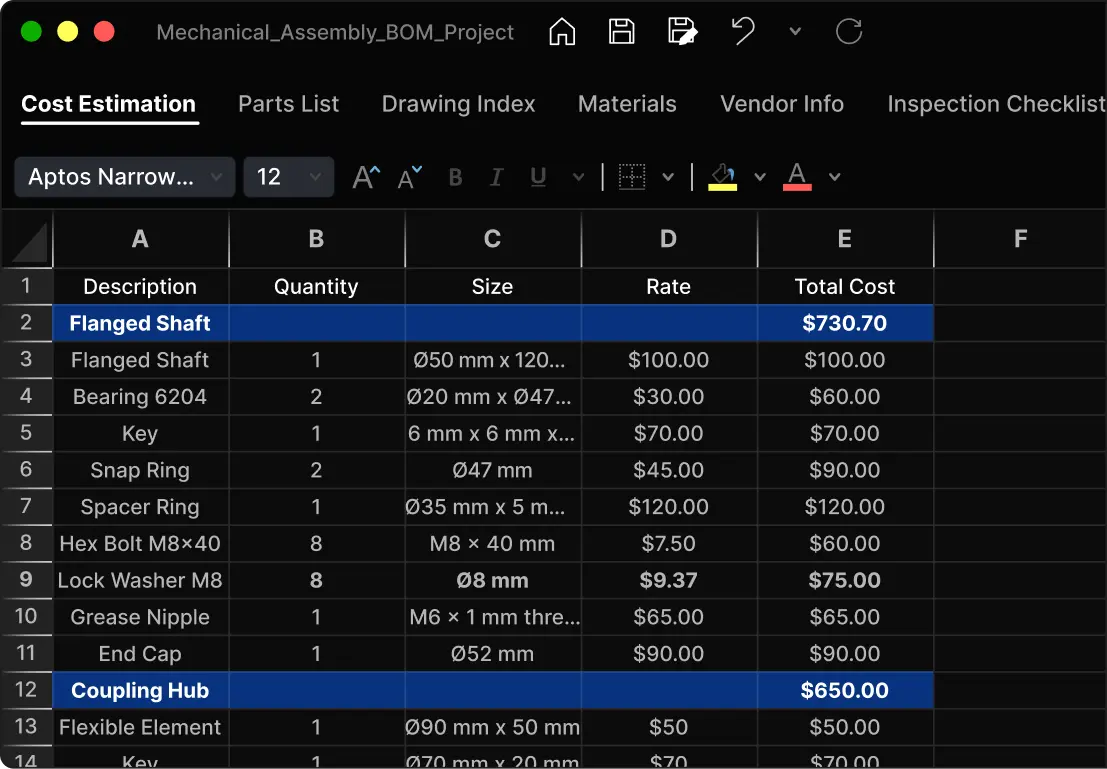
From Drawings to Structured Outputs – With AI Blueprint Classifier
The AI Blueprint Classifier transforms how engineering teams work with drawings — eliminating time-consuming manual review across BOM generation, quoting, and drawing comparison. It automatically identifies, organizes, and validates complex CAD drawings, delivering faster, more accurate outputs whether you need a structured BOM, a cost estimate, or a side-by-side revision check.
80%
Reduction in Manual Marking Errors
Minimizing errors for higher accuracy and reliability
30%
Faster Plan Reviews
Speeding up project timelines through automation
15%
Lower Labor Costs
Cutting labor expenses by optimizing workflows
80%
Reduction in Manual Marking Errors
Minimizing errors for higher accuracy and reliability
30%
Faster Plan Reviews
Speeding up project timelines through automation
15%
Lower Labor Costs
Cutting labor expenses by optimizing workflows
Built for Engineering-Critical Industries
Our AI Blueprint Classifier is designed for the real-world demands of engineers and manufacturers who need accuracy at scale. Whether you’re a design engineer generating EBOMs, a manufacturing engineer converting CAD to BOM, or an operations leader aligning MBOMs with production, the Blueprint Classifier automates classification, labeling, and data structuring.
Built for complexity. Trusted by engineers. Scaled for manufacturers.
Manufacturing

Manufacturing & Industrial Engineering
- Extracts dimensions, tolerances, and material specs from 2D drawings
- Validates fabrication specs against industry standards
- Flags QA inspection points before they reach the shop floor
- Generates MBOM, BBOM, and BoQ outputs ready for ERP integration
Automotive

Automotive Manufacturing & Engineering
- Extracts tolerances, threads, and finish specs from assembly drawings
- Flags assembly sequence conflicts before production release
- Validates drawings against automotive industry requirements
- Identifies components suited for prefabrication to reduce lead time
Aerospace

Aerospace & Defense Engineering
- Validates drawings against AS9100D, MIL-DTL-31000, and MIL-STD-31000 standards
- Flags tolerance and specification gaps before they reach production
- Tracks drawing revisions with full audit trail for first-article inspection and ECO workflows
- Deployable in air-gapped, on-premise environments for ITAR-controlled drawing packages
HVAC

Heating, Ventilation & Air Conditioning
- Identifies HVAC units, ductwork, vents, and diffusers from MEP drawings
- Flags space conflicts with structural and plumbing systems
- Detects missing connections, mislabeled zones, and airflow errors
- Validates system layouts against industry mechanical standards
MEP

Mechanical, Electrical & Plumbing
- Classifies ducts, conduits, and piping across multi-discipline drawing sets
- Flags clashes between mechanical, electrical, and structural elements
- Detects missing dimensions and installation orientation errors
- Tracks drawing revisions with full audit trail across ECO workflows
Construction

Construction & Civil Engineering
- Classifies structural layouts, rooms, walls, doors, and windows from PDF sets
- Detects dimension mismatches and coordination conflicts across trades
- Flags clashes between architectural, MEP, and structural drawings
- Generates accurate BoQs and material takeoffs for faster estimating
From Manual Headaches to Automated Accuracy
Stop wrestling with drawings. Start shipping faster.
 Current Reality
Manual BOM typing from drawings takes days
Missed GD&T tolerances cause costly rework cycles
BoQ creation for suppliers is slow and error-prone
ECO ping-pong between engineering and manufacturing
 With Blueprint Classifier
Automated MBOM, BBOM, and BoQ generation in minutes
Fewer production holds from specification errors
Smart supplier packets with accurate quantities
Complete traceability from drawing to finished product
Beyond ChatGPT: Purpose-Built Drawing Intelligence
Can I do this in ChatGPT?
We get this question a lot – and the answer is no. Free AI tools generate text summaries — they can’t extract structured, validated outputs from CAD files or blueprints.
The AI Blueprint Classifier is purpose-built for engineering-drawing intelligence: trained on engineering drawings, designed for accuracy, and ready to deliver the production-grade outputs manufacturers need — whether that’s a BOM, a takeoff, a compliance check, or a quote. Get rapid insights from blueprints and CAD files to accelerate material quantification, takeoff, and cost estimation. The Blueprint Classifier enables engineers to move from CAD to BOM, takeoff, or quote in minutes – supporting quicker, data-driven decision-making.
Instead of free-form text, the system generates schema-locked outputs — BOMs with part numbers, materials, tolerances, and costs, plus takeoffs, compliance reports, and quotes — ready for manufacturing use.
Every output comes with validation and traceability, giving you confidence it meets ASME, ISO, IS802, and your own custom rule packs where needed.
FAQs
AI Blueprint Classifier
How accurate is the CAD-to-BOM extraction?
Every extraction result includes a confidence score so your engineers know exactly where to review — and where to trust the output. The system understands GD&T notation, title block formats, and BOM structures across major international standards — not just OCR. Accuracy scales with drawing quality and we prove it on your files: we run a scoped POC on your actual drawings before any commitment so you see real results on your usecase, not someone else’s benchmark.
What file formats does the AI Blueprint Classifier support?
All major CAD output formats are supported — including PDF, DXF, STEP, and scanned technical drawings from PNG, JPEG, and TIFF sources, covering everything from digital-native exports to decades-old hand-drawn blueprints. If you have a specific format or CAD environment, we confirm compatibility during the POC — no surprises after you’re committed.
Is my drawing data secure? Do you offer NDA protection?
Yes. All demos and evaluations are NDA-protected before any files are shared. The platform is built with full drawing isolation — your data is never accessible to other customers or processed outside your agreed boundary. Three deployment modes are available: fully managed cloud (tenant-isolated and region-locked), VPC-enclosed hosting within your cloud environment, or full on-premise/air-gapped deployment for drawings that cannot leave your network. Every detection carries a full audit trail, and for regulated environments we provide compliance documentation covering data residency, retention, encryption, and sub-processors.
Can the output integrate with our ERP or PLM system?
Yes. Structured BOM outputs integrate with the systems your team already uses — PLM platforms like PTC Windchill and Siemens Teamcenter, ERP systems like Microsoft Dynamics 365, and construction/EPC platforms like Aconex and Procore, plus document storage such as SharePoint and Google Drive. For anything outside this list, a REST API and Zapier cover the rest, and we’ll scope a custom connector on request.
We're still exploring — can we see it work on our own drawings?
Absolutely. Most teams start with a no-commitment demo using sample drawings to see the output quality firsthand. When you’re ready, we run a scoped POC on your actual files under NDA — no sensitive drawings required upfront. You get real extraction results on your specific drawing types and BOM structures so the evaluation reflects your use case, not a controlled demo environment.
How does AI classify blueprints?
The AI scans your uploaded drawings — PDF, DWG, or STEP — and uses computer vision to automatically detect, segment, and label key elements based on your industry and drawing type. Each element is organized into structured, labeled outputs that feed directly into BOM creation, cost estimation, and compliance reporting.
What standards does the AI Blueprint Classifier support?
The AI Blueprint Classifier aligns with the drawing and documentation standards used across every industry it serves. Markovate also holds ISO 9001:2015 (quality management) and ISO/IEC 27001:2022 (information security) certifications across all deployments.
| Industry | Standards Supported | Key Capabilities |
|---|---|---|
| Manufacturing & Industrial Engineering | ASME Y14.5 (1994, 2009, 2018) | GD&T validation, dimension and tolerance extraction |
| Aerospace & Defense | AS9100D, MIL-STD requirements | Full revision traceability and audit trail support |
| Automotive | OEM & customer-specific documentation requirements | Drawing interpretation across high-revision workflows |
| HVAC & MEP | ASHRAE, standard MEP drawing conventions | Equipment identification and system classification |
| Construction & Civil Engineering | Standard architectural, structural & MEP documentation | BoQ and takeoff generation |
Experience AI Blueprint Classifier With Your Data
Evaluate blueprint readiness with your data—securely, confidentially, and risk-free. This form helps us assess drawing quality, volumes, and workflows—and uncover gaps that could impact accuracy, leads time, or ROI. All inputs are protected, never shared, and used solely to produce readiness insights.
OUR BLOGS
Point of view
Our thought leadership initiative – an exclusive platform for sharing our insights and technological perspectives.


