


Manufacturing AI Agents
We build Manufacturing AI Agents that read drawings, validate BOMs, and automate production, inventory, and maintenance workflows — including our proprietary CADIAM™ agent catalog, the drawing intelligence technology behind AI Blueprint Classifier.
Certified Quality & Security: ISO 9001:2015 & ISO/IEC 27001:2022
Enhancing Manufacturing Operations with Specialized AI Agents
Manufacturing companies face ongoing challenges with production line efficiency, inventory management, engineering drawing review, and maintenance requests — creating pressure on teams and risking operational delays. By adopting Manufacturing AI Agents, organizations can significantly reduce manual workloads, enhance operational precision, and deliver superior manufacturing outcomes.
We create Manufacturing AI Agents that operate 24/7, automating everything from routine production and inventory tasks to complex engineering workflows. Our product, AI Blueprint Classifier, runs on CADIAM™ — a catalog of specialized agents including P&ID, BOM, Takeoff, Compare, Search, Insights, Quote, and GD&T agents that turn CAD drawings into production-ready, citation-traceable intelligence. This lets manufacturing teams move from manual data handling to strategic, high-value work, minimizing human error and accelerating decisions across the shop floor and the engineering desk.
Purpose-built AI Agents for Engineering Workflows
Each one runs on its own — pick what fits your line. Reads native formats like DWG, DXF, STEP, and PDF, cuts quoting, tolerancing, and drawing comparisons from days to minutes, and pushes straight into your ERP, PLM, or CRM.
Turns a drawing into a costed, ERP-ready quote — material, run cost, margin, and win probability — for teams estimating parts or projects.
Reads tolerances, datums, and surface finish off any part drawing, and structures them into rows your quoting or ERP system can run.
Checks two drawing revisions against each other, comment by comment, and flags exactly what changed and where — no manual redlining.
Shows pipeline health, quote win-rates, and turnaround time in one view, so engineering and estimating teams see where work is stalling.
WHAT WE OFFER
How We Help with End-to-End AI Agent Implementation
We run a scoped, low-risk pilot on your own data — usually within a few weeks — so you see real output on your actual processes before committing to a full build.
OUR FEATURED WORK
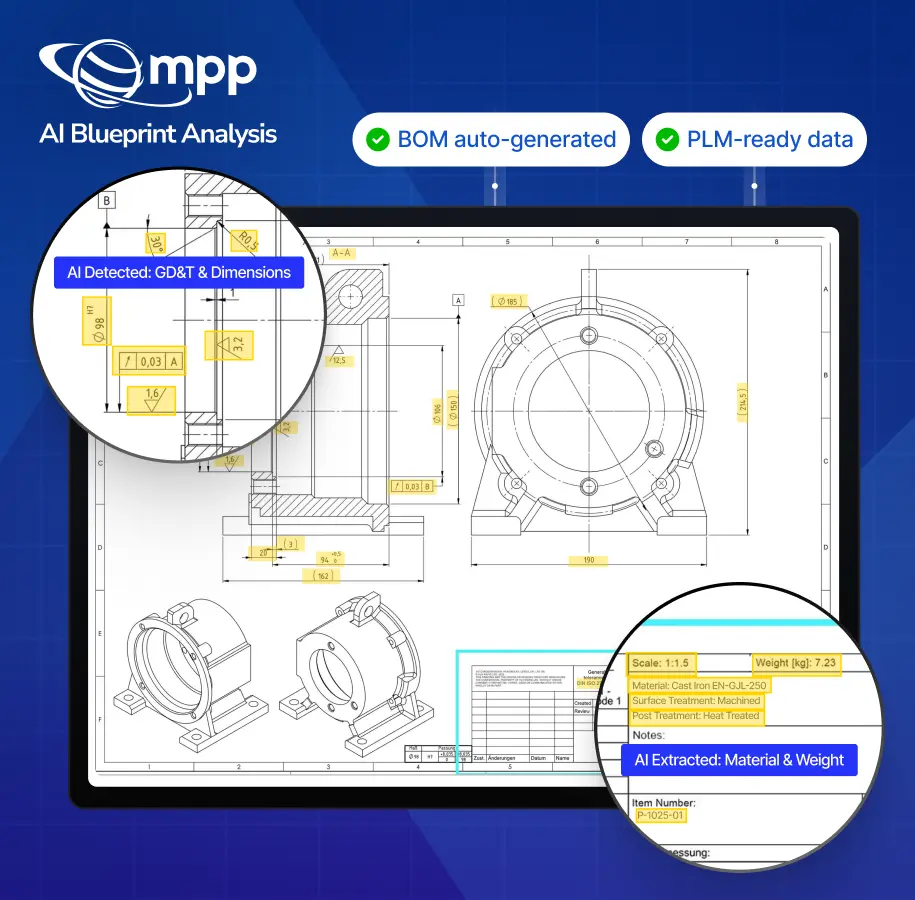
From CAD Drawings to Production-Ready BOMs, with AI Agents
We implemented our proprietary platform, AI Blueprint Classifier, powered by CADIAM™, for a mid-sized U.S. manufacturer. Drawing in, GD&T checked, labeled, structured, BOM out — one agentic workflow handling the full process end to end, reducing errors and manual effort at every stage.
- 80% reduction in manual marking and drafting errors
- 30% faster project estimation and design validation cycles
- Seamless ERP/PLM integration for real-time production data flow
- 15% lower operational costs through workflow automation
How a Manufacturing AI Agent Pilot Works

Share your data

Agents run on your data
We run the pilot against your actual data, not a sample set.

Measure the ROI
We compare output against your baseline and share the ROI the pilot delivered, typically within two weeks.
AI USE CASES FOR MANUFACTURING
Other Manufacturing Use Cases of AI
- AI Quoting and Estimation We accelerate quoting with AI-driven cost estimation, delivering fast, accurate quotes that win more business and reduce manual effort.
- AI BOM Software We streamline bill of materials generation with AI-powered extraction and validation, reducing errors and speeding up procurement.
- P&ID Digitization We convert P&ID drawings into structured, searchable digital data using AI, improving accuracy and accessibility across engineering workflows.
- Document Search and Synthesis We simplify knowledge retrieval with AI-driven document search and synthesis, delivering quick access to critical information and improving decision-making.
- Supply Chain Optimization We optimize supply chain operations with demand prediction, inventory management, and logistics coordination, improving efficiency and reducing costs.
FAQs
Manufacturing AI Agents
What file types do precision parts AI agents support?
The platform ingests DWG, DXF, STEP, and PDF files, including scanned drawings — as a single sheet or a full multi-page revision pack.
Can AI agents read GD&T tolerance callouts on PDFs and STEP files?
Yes. The GD&T agent reads part drawings end-to-end — title block, tolerance frames, datums, and surface finish — from both PDF and native STEP files, and structures the output into rows your quoting or ERP system can run directly.
How do AI quote agents integrate with Dynamics 365 and HubSpot?
Dynamics 365 and HubSpot are native connectors, so a generated quote — pricing, line items, and margin — pushes directly into your existing ERP or CRM. The same connector layer also supports PLM systems like Windchill, Teamcenter, and Autodesk Vault, and construction/EPC tools like Procore and Aconex.
Do we need to replace our existing ERP or CAD tools to use the manufacturing AI agents?
No. The agents are built to connect into the systems you already run — ERP, PLM, CRM, and CAD/drawing-review tools — rather than requiring you to adopt a new platform.
How is our drawing and quote data isolated from other customers?
Each customer runs on a dedicated, isolated instance, and data doesn’t cross between tenants. Your drawings, quotes, and outputs stay fully separate from every other customer on the platform.
Is the AI trained on our drawings, or is our data kept separate?
No. Your drawings are never used to train or fine-tune models for other customers. What you upload stays yours — it’s used only to generate your outputs, not to improve the system for anyone else.
What's included in the audit trail for each extracted output?
Every extracted entity — a dimension, a tolerance, a BOM line — carries its source page, exact location on the drawing, a confidence score, and a timestamp, so any output can be traced back to precisely where it came from on the original file.
OUR BLOGS
Point of view
Our thought leadership initiative – an exclusive platform for sharing our insights and technological perspectives.


