

A new customer CAD file does not always mean a new part. Manufacturers often receive CAD files for components that may already exist in their part library. The challenge is finding that connection.
A new file may use a different name, contain limited metadata, or look slightly different from an existing model. Engineers then have to search their part records, compare components, check dimensions, and determine whether an existing part already fits.
That work can take time, especially when a company has a large CAD and part library.
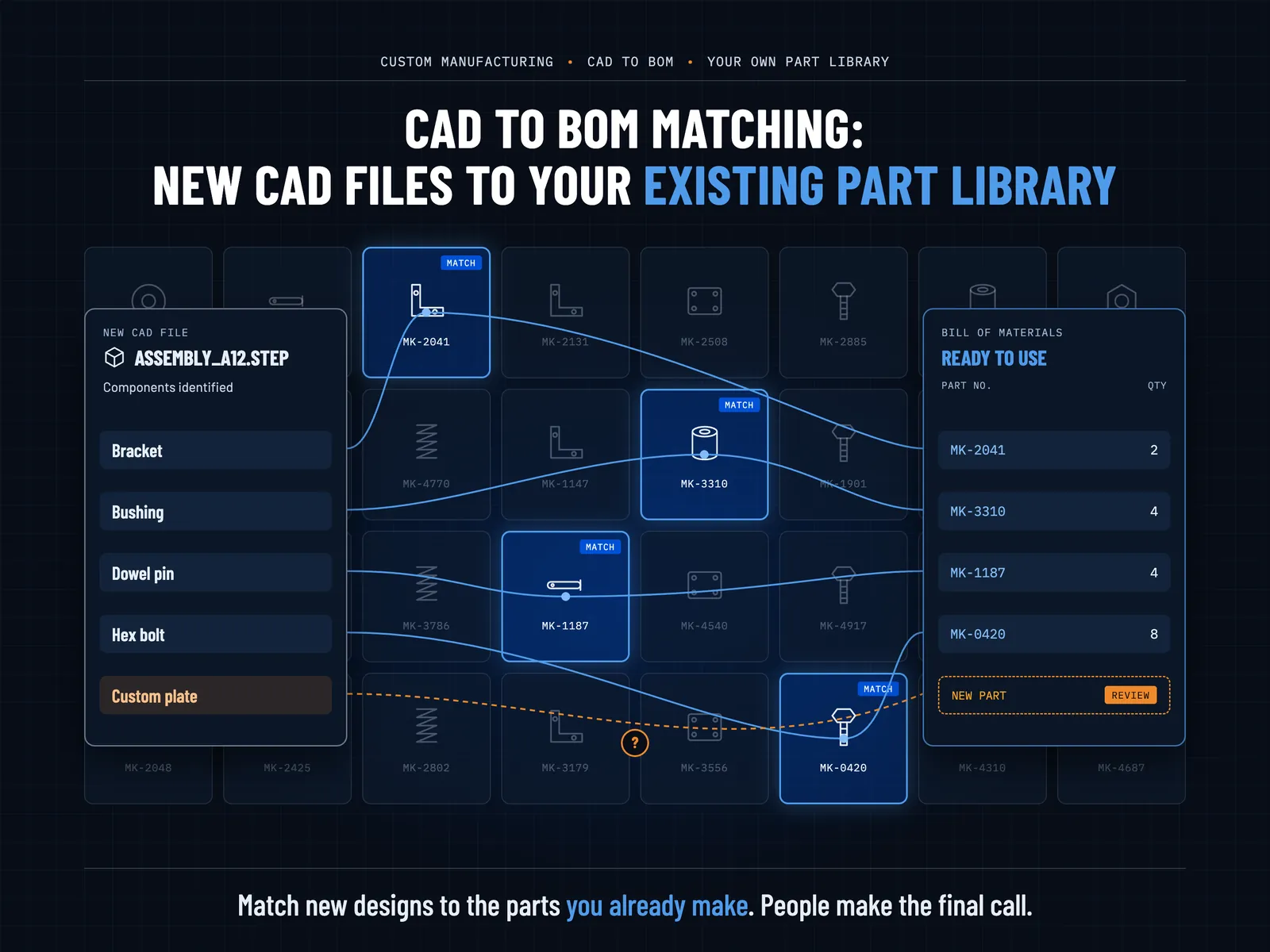
CAD-to-BOM matching can connect new CAD components with existing part records. Instead of starting with a blank BOM, teams can compare incoming components against their own library and identify potential matches.
The goal is simple: recognize parts the business already knows before creating or sourcing something new.
Why CAD to BOM Matching Needs Your Own Part Library
A manufacturer’s part library contains information that matters to its own workflows. It may include:
- Part or article numbers
- Existing CAD models
- Component names and descriptions
- Dimensions and other attributes
- Approved or previously used parts
- Internal identifiers and records
A general parts database can help identify what a component looks like or what type of part it may be. But it may not contain the manufacturer’s own numbering system or approved part records. That creates an important distinction.
The question is not only:
“What type of component is this?”
It is also:
“Which existing part in our library does this component correspond to?”
That second question matters when a company wants to avoid unnecessary duplicate parts.
Existing CAD and BOM systems already use different ways to connect CAD components with part records. These can include part numbers, CAD keys, names, or other identifiers.
AI can extend this process by helping teams identify potential matches when a direct identifier is not available.
How CAD to BOM Matching Works
The process starts with a new CAD file or assembly. The goal is to move from that CAD data to a structured BOM with the right part records.
1. Start With the New CAD File
The process begins with a customer-supplied CAD file, assembly, or related design data. The file may contain several components. Some may be completely new. Others may already exist in the manufacturer’s library.
So, the first step is to identify the components that need to be matched.
2. Identify the CAD Components
The system analyzes the available CAD information for each component. Depending on the file, that information can include geometry, dimensions, names, metadata, and other available attributes.
This creates a structured view of the components that need to be checked against the existing library.
3. Compare Components With the Existing Part Library
The identified components can then be compared with the company’s existing part records. Different signals can help with this comparison.
These may include:
- Geometric similarity
- Part names
- Dimensions
- Metadata
- Internal identifiers
- Other available component attributes
Geometry can provide a useful matching signal, but it should not be the only consideration. A strong matching process should use information from both the new CAD component and the existing part record.
4. Identify a Potential Part Match
The system can then return the most likely existing part or article number. For example, a new CAD component may resemble a part already stored in the company’s library.
Instead of creating another record, the workflow can identify that existing part as a potential match.
Not every match will be equally clear. Uncertain results should remain available for human review rather than forcing an automatic decision. This matters because the final part decision may depend on engineering requirements, internal standards, or other information that is not visible in the CAD geometry alone.
5. Determine the Quantity
Once components are matched, the workflow can group repeated occurrences. If the same existing part appears several times in an assembly, those occurrences can contribute to the total quantity.
This creates a clearer connection between the CAD structure and the BOM.
CAD-to-BOM systems already use this type of relationship: for example, SAP documentation describes assigning CAD components to existing material records and then deriving a BOM, summarizing identical components with their quantities.
6. Build the BOM
The final step is to organize the matched components into a structured BOM.
A typical output can include:
- Part or article number
- Component name
- Quantity
- Matched CAD component
- Relevant attributes
- Source or reference information
The result can give manufacturers a BOM structured around their existing part records when those records are available to the matching workflow.
From Matched Parts to a Ready-to-Use BOM
Matching is only useful if the result can move into the next stage of the workflow. A structured BOM gives teams a clearer way to review what the CAD file contains and which existing parts correspond to those components.
For example, an output could show the following matches:
| CAD Component | Matched Part | Quantity |
|---|---|---|
| Component A | Part 10452 | 4 |
| Component B | Part 20781 | 2 |
| Component C | Part 31509 | 1 |
This structure makes it easier to review the relationship between the incoming CAD file and the existing part library.
It can also reduce the need to manually copy part numbers and quantities into a separate BOM.
The exact downstream workflow will depend on how the manufacturer manages product data. Some teams may move the information into ERP or PLM systems. Others may use it for quoting, procurement, engineering review, or internal part management.
The important part comes earlier. The BOM should reflect the parts the company actually uses and recognizes.
How AI Blueprint Classifier Supports the CAD-to-BOM Workflow
AI Blueprint Classifier supports the CAD-to-BOM workflow. It can ingest CAD-native formats such as DWG, DXF, and STEP, extract engineering information, and produce structured outputs including BOM data. The BOM Agent can roll up a bill of materials across a drawing pack with per-entity provenance.
This makes AI Blueprint Classifier relevant to the workflow described above, while the exact-matching logic can be extended to a manufacturer’s own data and part structure. Our platform supports per-tenant extensibility, including customer-specific part catalogs and rule packs.
Read CAD Data and Extract Components
It can work with CAD-native engineering files and extract information such as geometry, dimensions, GD&T, BOM marks, and notes.
This gives teams structured engineering data that can serve as the starting point for downstream BOM workflows.
Connect Components With Structured BOM Data
AI BOM Agent can roll up bill of materials information across a drawing pack and return structured Excel, CSV or JSON output with provenance for each entity. That creates a clearer path from engineering drawings to usable BOM data.
Extend the Workflow Around Your Part Catalog
A manufacturer may also need to connect extracted CAD components with its own part records. That requires more than generic component recognition. It requires the company’s own part numbers, catalog structure, rules, and matching logic.
AI Blueprint Classifier has an agent catalog of customer-specialized agents built around “your part catalog” and custom rule packs.
That makes the platform suitable for building a company-specific CAD-to-part matching workflow when the use case requires it, rather than forcing every manufacturer into the same part structure.
Keep People in the Decision
A match should not become an automatic engineering decision. Some components will have clear matches. Others may have several possible candidates or insufficient information. Those cases need review.
The platform keeps engineers in control of the final decision, with structured outputs and source-level provenance available for review.
The goal is to reduce the manual search and comparison work while keeping the manufacturer in control of the final part decision.
Want to see how AI Blueprint Classifier can connect CAD data with structured BOM workflows? Book a demo to explore the platform.
Why This Matters for Custom Manufacturing
For custom and contract manufacturers, every new customer design can introduce unfamiliar CAD data. But unfamiliar does not always mean new.
The same component may already exist under an internal part number. It may already have a CAD model, description, and history in the company’s systems.
Finding that existing part can help prevent duplicate records and unnecessary part creation. It can also make the path from customer CAD to BOM more consistent.
That is where CAD to BOM matching becomes more than a CAD automation task. It becomes a way to connect new design data with what the manufacturer already knows.
Conclusion: CAD to BOM Matching
In conclusion, a new CAD file does not always require a new part. Manufacturers often have existing components that match what appears in incoming customer designs. The challenge is finding those matches quickly and reliably.
CAD-to-BOM matching can help by comparing new CAD components against an existing part library, identifying potential matches, grouping quantities, and organizing the results into a structured BOM.
For manufacturers, the value is not simply generating a BOM from CAD. It is connecting new engineering data with the parts, records, and rules the business already uses.
The most useful workflow isn’t simply generating a BOM from CAD. It is about answering a more practical question: “
Do we already have this part?”
When that answer is available earlier, manufacturers can spend less time searching through part records and more time reviewing the design and making the right engineering decisions.
FAQs
1. What is CAD to BOM matching?
CAD to BOM matching connects components found in CAD data with existing part or article records. It can help identify matching parts, determine quantities, and create structured BOM data.
2. How does AI match CAD components to existing parts?
AI can compare CAD components using available information such as geometry, dimensions, names, metadata, and identifiers. It can then identify potential matches from an existing part library.
3. Can CAD components be matched against a company’s own part library?
Yes. A CAD-to-BOM workflow can compare incoming components against a company’s own part records. This helps connect new CAD data with existing internal part or article numbers. The exact matching approach depends on the available CAD information, the company’s part catalog, and the rules used to determine an acceptable match.
4. Can CAD-to-BOM matching generate a BOM automatically?
It can help generate structured BOM data from matched CAD components and quantities. However, uncertain matches may require human review before the BOM becomes an approved engineering record.