

AI in preconstruction is moving from experimentation to practical use as more companies invest in AI. Preconstruction covers everything a project team reviews and decides before construction starts. AI is becoming part of that process, helping teams move through dense project information faster and catch issues before they turn into costly changes later.
This blog looks at where AI is being applied across preconstruction today, how it is changing the work of estimators and project teams, and what it takes to make these applications reliable.
How AI in Preconstruction Fits Into a Project’s Workflow
Preconstruction brings together information from many parts of a project. Teams review drawings and specifications, work through quantities and estimates, assess bid requirements, and identify issues before a project moves forward. AI can support different parts of this workflow by helping teams find, organize, and analyze that information earlier.
The role of AI is not limited to one task. A drawing can provide quantities for a takeoff, specifications can provide scope requirements, and bid documents can reveal information that affects pricing or risk. Connecting these pieces helps teams move from finding information to using it without treating every stage as a separate exercise.
From Project Documents to Decisions: Preconstruction Workflow
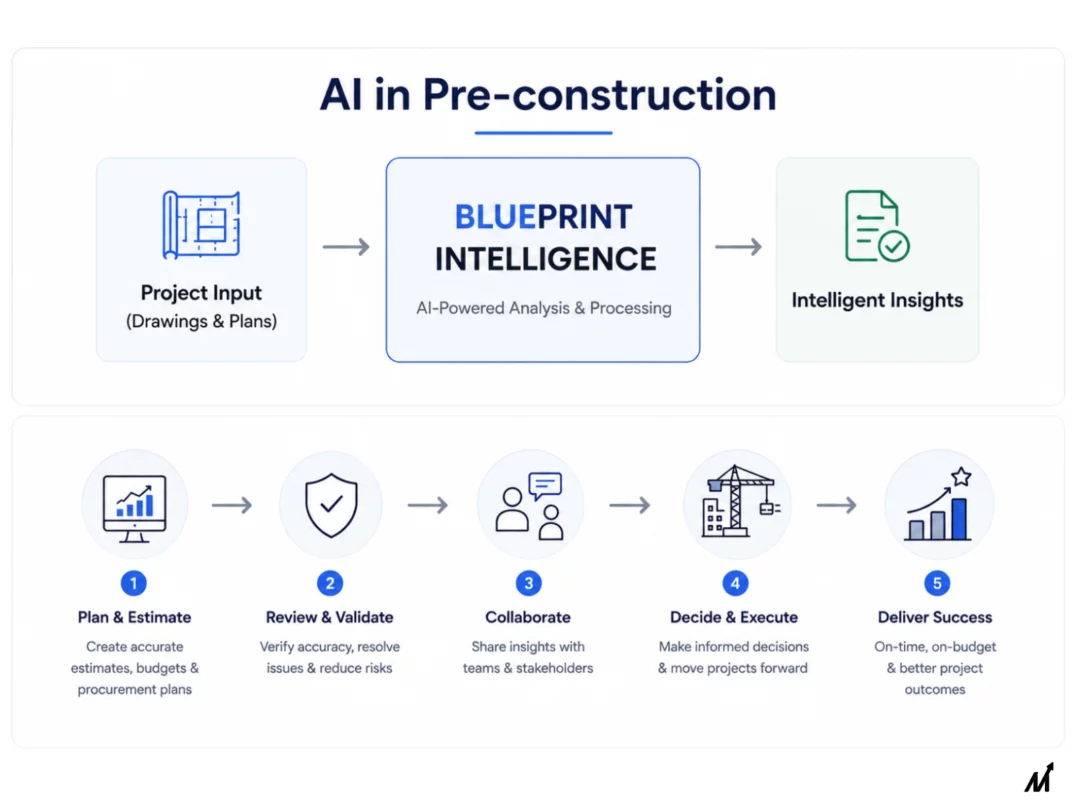
A practical preconstruction workflow can be viewed as a series of the following connected steps:
1. Review Project Information
Drawings, specifications, schedules, RFQs, and other documents are reviewed to understand the project and identify the information needed for the next stage.
2. Analyze Drawings and Documents
AI can help locate relevant dimensions, symbols, notes, schedules, and other drawing information across large document sets. This is particularly useful when important information is spread across multiple sheets.
3. Build Quantities and Estimating Inputs
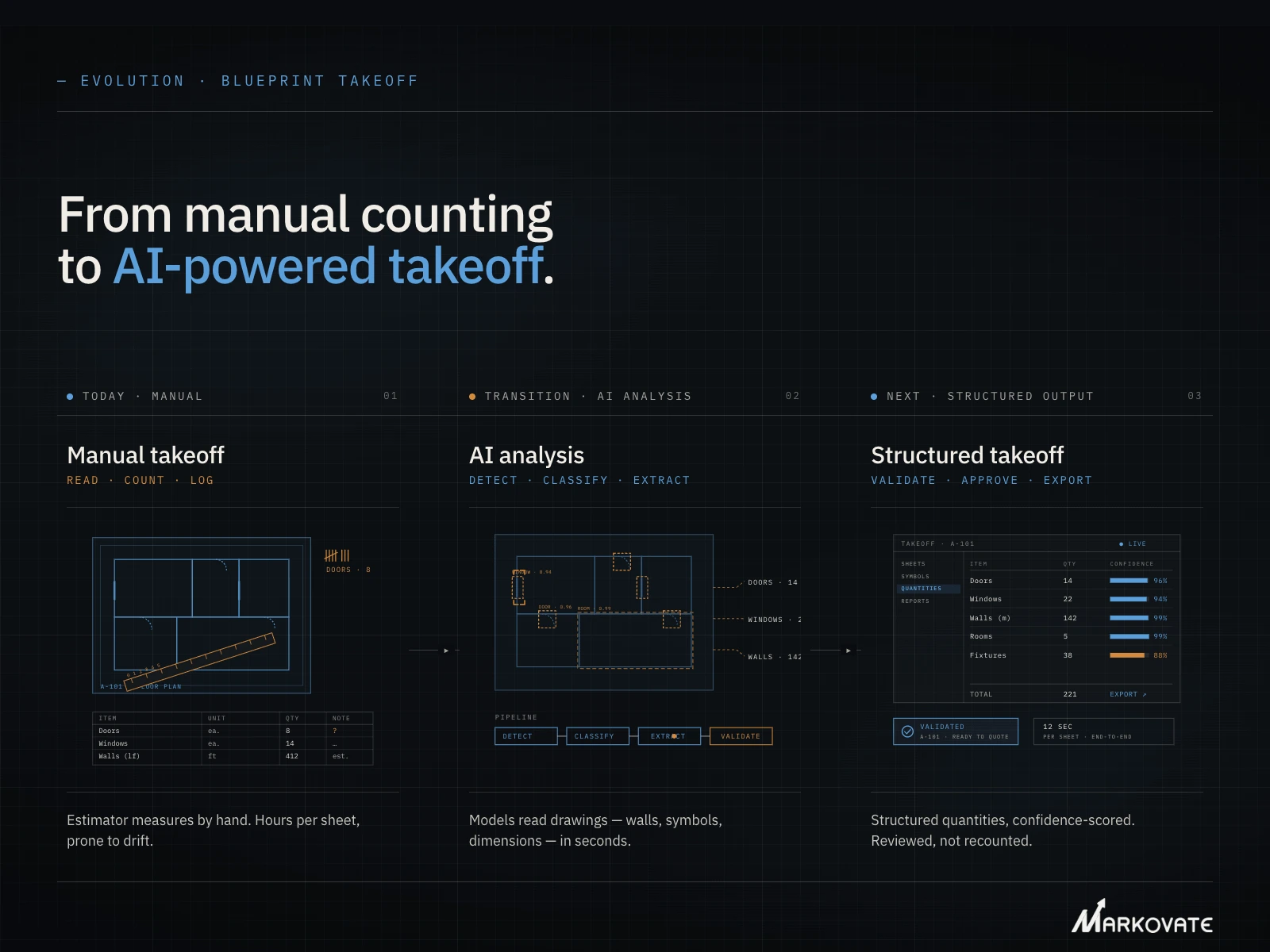
The information identified in drawings can be turned into structured quantities for takeoff and estimating workflows. For example, our AI Takeoff Software can detect and count drawing elements, measure them where applicable, and return quantities with references to their source locations.
4. Review Bids, RFQs, and Scope
AI can help teams work through RFQs, scope documents, and other requirements to surface information that needs attention before a price or bid is prepared.
5. Identify Issues and Support Decisions
As information is brought together, AI can help flag inconsistencies, missing information, or items that warrant closer review. The team still makes the final decision, particularly when project context or commercial judgment is involved.
6. Carry Structured Information into the Next Workflow
The value does not end with finding an answer. Quantities, extracted details, and other project information can be structured for downstream estimating, quoting, review, or other systems.
A blueprint intelligence platform can do more than automate repetitive tasks—it can also generate insights and reports that would otherwise take significant time to produce. CADIAM™ TakeOff and Estimating software is an example of this intelligence in action.
AI in Preconstruction: Key AI Applications Taking Shape Today
AI is already being used across several preconstruction tasks. The focus is shifting from general experimentation to work that teams can apply to real projects. Here are the top AI applications under preconstruction workflows:
1. Drawing and Document Analysis
Preconstruction starts with a large amount of project information. Drawings, specifications, schedules, and other documents all need review before teams can price and plan the work.
AI can help find relevant information across these documents and bring related details together. This is especially useful when project information spans hundreds of sheets or multiple document types.
2. Quantity Takeoff
Quantity takeoff is one of the clearest areas where AI is already being applied. AI can recognize drawing elements, count repeated items, and extract quantities from plans.
The useful part is not just getting a quantity. Teams also need to know where that quantity came from and have a way to review it before using it in an estimate.
3. Estimating and Cost Analysis
Once quantities and project requirements are available, teams can use AI to support cost analysis. This can include comparing historical project data, identifying cost patterns, and bringing relevant estimating information together.
AI can also help surface potential cost issues earlier, before they turn into the kind of downstream change order backlog many teams deal with later.
4. Bid and RFQ Analysis
Preconstruction teams often review multiple RFQs, bid documents, and scope requirements at the same time. AI can help organize this information and surface requirements that need attention.
This can make it easier to compare opportunities, review bid requirements, and decide where deeper analysis is needed. Bid management and subcontractor qualification are also emerging areas for AI use in preconstruction.
5. Scope and Specification Review
Scope gaps can become expensive when they are discovered late. AI can help review drawings, specifications, and other project information to identify inconsistencies, missing details, or requirements that may need further review.
This is different from simply searching documents. The goal is to help teams understand what the information means for the scope of work and where closer review may be needed.
6. Risk and Schedule Analysis
Some preconstruction risks are visible in the information teams already have. Cost changes, unclear scope, schedule constraints, and other project conditions can affect decisions before construction begins.
AI can help identify patterns and flag potential risks across project information. It can also support early analysis of cost, schedule, and resource considerations.
7. Design and Early Decision Support
AI in preconstruction can also support decisions before designs and budgets are finalized. Teams can compare options, review project information, and assess potential cost or schedule effects earlier in the process.
This moves AI beyond individual tasks. It helps bring information into decisions while there is still time to change the direction of a project. Current industry coverage points toward this broader role for AI across design, estimating, risk, and planning.
A Quick Recap: Table Representing AI in Preconstruction Workflow
| Preconstruction Stage | What Teams Work With | Where AI Can Help |
| Project Information | Drawings, Specifications, Project Documents | Find, Organize, and Summarize Relevant Information |
| Design & Document Review | Drawings, Notes, Specifications | Identify Details, Inconsistencies and Items Needing Review |
| Takeoff & Estimating | Quantities, Measurements, Cost Information | Extract Quantities and Support Estimating Workflows |
| Bid & RFQ Review | RFQs, Scope Documents, Bids | Compare Requirements and Surface Relevant Information |
| Risk & Scope Review | Project Requirements, Changes, Historical Information | Flag Potential Issues and Areas that Need Attention |
| Preconstruction Decisions | Information Gathered Across the Workflow | Bring Relevant Information together for Review and Faster Decisions |
We have read about some of the top AI in preconstruction applications, but how are these impacting individuals’ work within teams? Let’s read about that!
How Preconstruction AI Is Changing Estimator and Project Teams’ Work
AI can take on parts of the information-heavy work in preconstruction, but it does not remove the need for experienced professionals. The bigger change is how teams divide their time between processing information, reviewing results, and making decisions.
1. Less time spent on information-heavy tasks
AI can help teams find, organize, and process information across drawings, specifications, bids, and other project documents. This can reduce time spent on repetitive work such as document review and quantity gathering.
2. More focus on review and project context
AI-generated results still need to be checked against the project. Site conditions, design intent, client requirements, constructability, and market conditions can affect an estimate in ways that a system may not capture.
3. Estimators can spend more time on higher-value decisions
When AI handles parts of the information-gathering process, estimators can spend more time refining estimates, evaluating options, reviewing risks, and advising project teams. This supports the shift toward a more strategic role described in current industry coverage.
4. Accountability for what ships doesn’t change
A flagged risk or an extracted quantity is still just an input. Whether it’s right for the project, and what to do about it, stays a human call.
None of this works well without one thing: clean and traceable data. Here is how!
Connected Data: Making Preconstruction AI Work Effectively
Preconstruction AI is only as useful as the project information behind it. Drawings, specifications, takeoffs, estimates, schedules, and historical project data each provide part of the picture. When that information stays disconnected, AI has less context to work with.
Connected data brings these sources together so AI can relate information across the project. A drawing detail can be considered alongside specifications, quantities, or schedule information instead of being treated as an isolated file. This gives teams more useful analysis and helps carry information from one preconstruction activity into the next.
That is the real foundation for effective preconstruction AI: not simply more data, but reliable, connected project information that AI can understand in context. And we understand this layer well. That’s why we designed our AI Blueprint Classifier to give auditable accuracy and traceable results, with each customer’s drawing and project data kept isolated within their own environment rather than shared across accounts.
Make Your Takeoff Process Faster and More Accurate
Get reliable quantities from complex drawings and move from takeoff to bid with greater confidence.
What Comes Next for AI in Preconstruction
Preconstruction AI is still early. A few trends point to where it goes next.
1. Design options generated earlier in the process
AI can already produce multiple design layouts based on cost, material, and performance targets. That capability is moving earlier into preconstruction, so teams compare options before a single estimate gets built.
2. Cost models that update as design changes
Instead of running a fresh estimate every time scope shifts, cost models will update in near real time. A design change and its budget impact will show up together, not days apart.
3. Agentic AI taking on more of the process
Early AI tools mostly handled a single task in isolation, like flagging a clash or extracting one data point. The next step is a set of purpose-built agents working on the same underlying project data, each handling one part of the process well, instead of one general tool trying to do everything adequately. Our platform AI Blueprint Classifier already works this way, with agentic solutions for tasks like takeoff, BOM validation, and drawing comparison.
4. BIM models connected to what happens after them
Clash detection and predictive scheduling inside BIM platforms keep getting sharper, catching conflicts and sequencing issues earlier than manual review would. The bigger shift is linking that model data to what comes next- estimating, procurement, field execution- instead of leaving BIM as a disconnected step on its own.
5. Governance keeping pace with adoption
As AI takes on more of the process, teams need clearer answers on where its data comes from and how its outputs get used. Businesses that build this in now will have an easier time scaling later.
Conclusion
AI in preconstruction is already changing how estimators and project teams spend their time. It’s not replacing their judgment. It’s clearing out the repetitive work that used to eat most of the day.
The companies getting real value from it aren’t the ones running the most AI tools. They are the ones whose drawings, specs, and project data are clean and connected enough for those tools to actually work with. That’s the part most conversations about AI in preconstruction skip past. A fast takeoff or a generated estimate is only as accurate as the data behind it.
That’s exactly the layer we have focused on. Our AI Blueprint Classifier reads engineering and construction drawings accurately enough for everything downstream- takeoffs, estimates, BOMs- to actually hold up.
Want to see what AI-powered blueprint intelligence can do for your pre-construction workflow?
Book a Demo to explore how it turns complex drawing sets into actionable project intelligence.
FAQs: AI in Preconstruction
1. Will AI replace construction estimators?
No. AI takes over repetitive work like counting and measuring, but judgment on scope, risk, and constructability still requires an experienced estimator. Most current coverage agrees the role is shifting toward more strategic work, not disappearing.
2. How accurate is AI in preconstruction, and does it still need to be checked?
Accuracy depends on the tool and the quality of the input data. Even strong AI tools still need an estimator to review flagged or uncertain results before they go into a bid.
3. What does a team need before adopting AI in preconstruction?
Clean and organized project data. Practitioners consistently point to this as the real starting point, since AI tools built on disconnected or messy drawings and specs underperform no matter how capable the tool itself is.
4. Is it safe to put project data into AI tools?
Yes. Our platform is designed to process project data securely, with each customer’s drawings and project data kept isolated within their own environment. This gives teams a secure way to use AI with proprietary drawings and sensitive project information while maintaining control over their data.