

A drawing lands in an RFQ inbox. Someone runs it through an OCR tool, or pastes it into a generic AI tool and asks for the dimensions. The answer looks reasonable. It’s often wrong in ways nobody catches until the quote is already out.
Neither tool is broken. OCR is built to recognize characters. A large language model is built to reason over text. Reading a technical drawing correctly requires something neither one was designed to do: understanding how a tolerance, a datum, and a feature relate to each other on the sheet.
This blog looks at what RFQ data extraction actually requires, where generic tools fall short, and what a purpose-built extraction pipeline does differently.
What RFQ Data Extraction Actually Requires
Turning a drawing into a usable quote input means pulling out dimensions, tolerances, GD&T callouts, material specs, and BOM data, then structuring all of it consistently. Every field has to be correct, because pricing, machine selection, and inspection requirements all get built on top of it.
This isn’t a one-time read. The same drawing often needs to be checked against a prior revision, cross-referenced with a BOM, and reconciled with cost history. That’s a data pipeline, not a single question-and-answer exchange.
Once you look beyond simple text extraction, the shortcomings of generic tools become much easier to understand.
Where Generic Tools Fall Short
Two categories of tools get tried here most often, and both run into the same underlying problem for different reasons.
Traditional OCR reads characters, not context
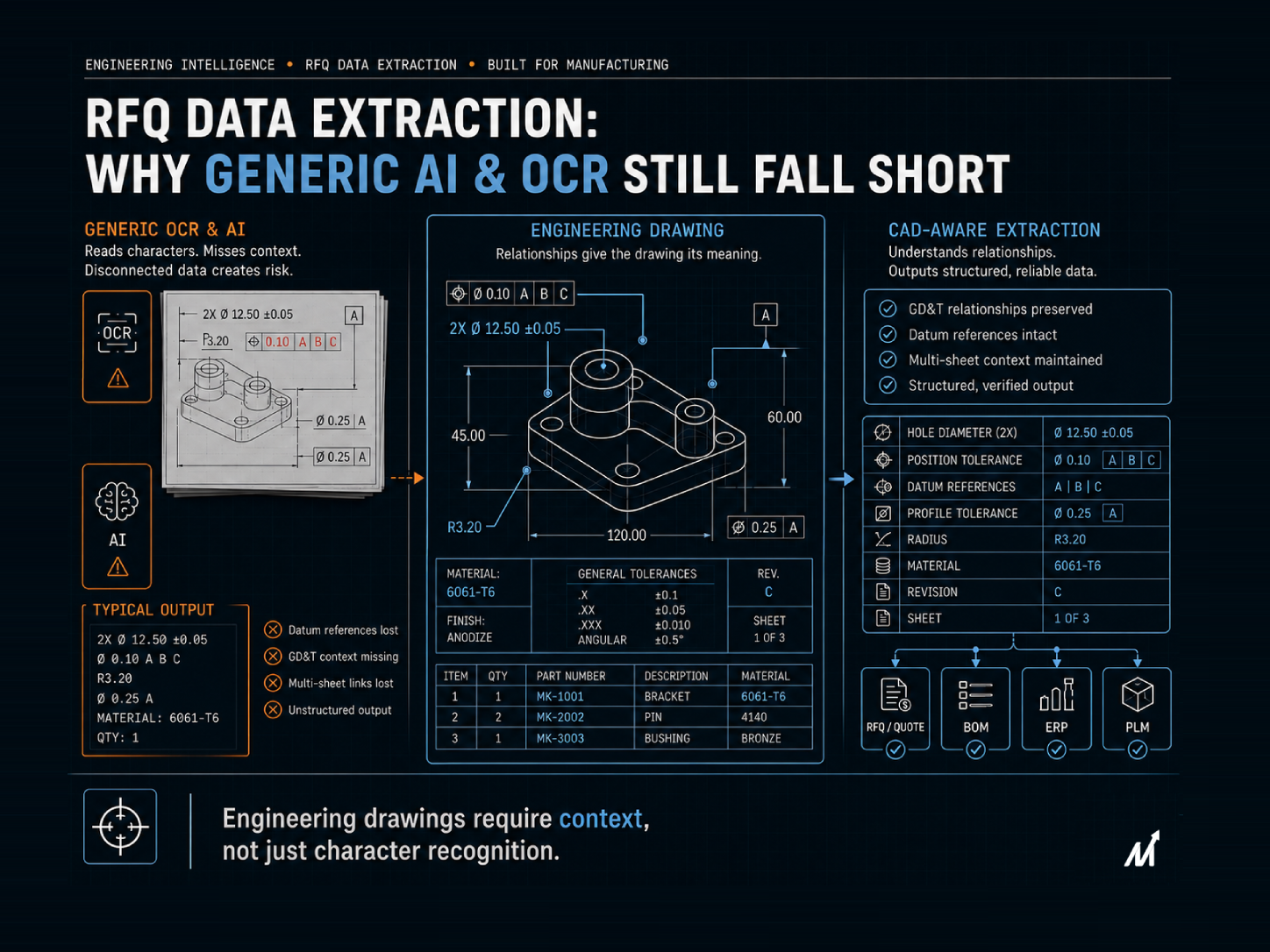
OCR recognizes text and numbers on a page. It doesn’t understand what a callout means or which feature it controls. A tolerance gets extracted as a string of characters, disconnected from the datum it references or the surface it applies to. The output needs a person to reassemble the meaning afterward, which puts the manual step right back into the process.
Generic LLMs answer with confidence, not consistency
A large language model given a drawing as an image describes what it sees in plain language. To do that, the drawing usually gets flattened into a screenshot or PDF export first, and that step alone strips out precision the model never recovers — a tolerance rendered slightly blurry, a callout partially cropped, a dimension line crossing another one. The model doesn’t know what it’s missing. It answers either way confidently, and two runs on the same drawing can produce two different answers.
The reason both OCR and generic AI produce inconsistent results comes down to one fundamental difference: engineering drawings communicate through structure, not just text.
Why a Drawing’s Structure Matters More Than Its Text
A drawing carries information in its structure, not just its labels. A tolerance means nothing without knowing which surface it references. A GD&T symbol means nothing without its datum frame. A dimension means nothing without the view it belongs to.
Neither OCR nor a generic LLM parses those geometric relationships the way a CAD-aware system does. One reads characters. The other reads pixels and guesses at meaning. Both skip the structure that actually determines what the drawing is saying.
Because RFQ data extraction feeds directly into the quoting process, missing engineering relationships don’t stay confined to the extraction step. They become inaccurate inputs for downstream workflows, from cost estimation to production planning. The most common issues tend to appear in a few predictable areas.
What Gets Missed: GD&T, Tolerances, and Multi-Sheet Context
A few patterns show up consistently when generic tools handle technical drawings for RFQ purposes.
1. Datum references get dropped
A true position callout only means something relative to its datum reference frame. Generic tools frequently report the tolerance value without correctly linking it to the right datum, which changes what the callout actually requires.
2. Multi-sheet drawings lose their connections
A part with several sheets, or a drawing referencing a separate spec sheet, needs those documents read together. Generic tools handle one input at a time and don’t reliably carry context across multiple files in a single, structured output.
3. Output isn’t structured for downstream use
Even a correct answer from OCR or a chat interface comes back as raw text or unlinked characters. Getting that into a BOM, an ERP field, or a cost model still requires someone to manually transcribe it, so the extraction step and the re-keying step both still happen by hand.
If generic tools fail because they ignore engineering relationships, the obvious question becomes: what does a system designed specifically for technical drawings do differently? Here is the answer!
What a Purpose-Built Extraction Pipeline Does Differently
A system built specifically for engineering drawings works from the geometry itself, not a flattened image or a character scan of it. It ingests native formats like DWG, DXF, or STEP directly, so nothing gets lost to conversion first.
It also holds structure the way an engineer would: linking a tolerance to its datum, keeping a GD&T callout tied to the feature it controls, and carrying context across multiple sheets in the same job. The output comes back as structured fields, not raw text or prose, so it can flow directly into a BOM, a quote, or an ERP system without manual re-entry.
That’s the practical difference. Not smarter answers; a system built to hold the structure a drawing actually has.
Markovate’s AI Blueprint Classifier was built around these engineering-specific requirements rather than adapting general-purpose AI to technical drawings.
How Markovate’s AI Blueprint Classifier Reads a Drawing the Way Generic Tools Can’t
Markovate’s drawing intelligence platform, AI Blueprint Classifier, built on the CADIAM™ engine, reads engineering drawings directly rather than scanning characters or describing an image.
1. Built on drawing geometry, not chat prompts or character recognition
The platform ingests DWG, DXF, STEP, PDF, and scanned drawings natively. GD&T callouts, dimensions, and tolerances get extracted with the datum and feature relationships intact, not flattened into plain text or disconnected characters first.
2. Every extracted field traces back to the drawing
Each output links to the exact location on the sheet it came from. An estimator or engineer can verify a value in seconds instead of re-checking the whole drawing by hand.
3. Structured output, ready for downstream systems
Extracted data exports as structured BOM, cost, or quote fields, ready for ERP or PLM systems. There’s no intermediate step where someone retypes an OCR scan or a chatbot’s answer into a spreadsheet.
4. Built for enterprise data requirements
Each deployment runs in its own tenant, on Azure US or Azure EU depending on data residency needs, with no cross-customer training on drawing data. The platform runs on Markovate’s ISO 27001- and ISO 9001-certified infrastructure, which matters for manufacturers handling controlled or proprietary drawings.
If your RFQ process still depends on OCR, spreadsheets, or manual validation, book a demo to see how AI Blueprint Classifier delivers structured, engineering-aware extraction.
Conclusion: The Right Tool Reads the Structure, Not Just the Surface
OCR and generic LLMs aren’t built to fail here. One reads characters. The other reads text and pixels. Neither one was built to understand how a tolerance, a datum, and a feature relate to each other on a drawing.
For RFQ data extraction, that gap decides whether a quote is built on accurate inputs or on a confident guess. A purpose-built pipeline reads the structure a drawing actually has. That’s the gap neither a character scanner nor a chat interface can close on its own. Check our AI Blueprint Classifier’s RFQ and quote automation capability for more details!
FAQs: RFQ Data Extraction Beyond Generic OCR and LLMs
1. Is OCR good enough for extracting data from engineering drawings?
OCR can recognize text and numbers, but it doesn’t understand what a callout means or which feature it controls. It usually still requires manual review to reassemble the correct meaning.
2. Can ChatGPT or other LLMs read engineering drawings accurately?
They can describe what’s visible in an uploaded image, but they don’t reliably parse tolerances, datum references, or GD&T relationships the way a purpose-built system does.
3. Why do generic tools struggle with GD&T callouts specifically?
GD&T symbols only make sense relative to a datum reference frame. Generic OCR and LLM tools often extract the symbol or value without correctly linking it to that context.
4. What’s the difference between a generic tool and a purpose-built drawing extraction platform?
A generic tool reads characters or reasons over an image. A purpose-built platform reads native CAD formats directly and keeps geometric relationships intact, producing structured, reusable data instead of raw text.
5. Is the AI Blueprint Classifier just an OCR tool?
No. AI Blueprint Classifier goes beyond OCR by understanding engineering semantics. Powered by CADIAM™, it extracts and interprets GD&T symbols, tolerance stacks, BOM annotations, title block metadata, and other engineering information while normalizing data to ISO and ASME standards.